Viet Nam's Information Technology Industry

Trích từ bài viết đăng tải tại forum của trường Đại học Khoa Học Tự Nhiên TPHCM:

Thưa các anh chị,

Tôi có nhiều buổi nói chuyện với các bạn tôi và một số người về điều mà VN chúng ta đang đặt ra các con số. Con số 20,000 tiến sỹ rồi 1 triệu kỹ sư CNTT. Tất cả chỉ vì một mục đích 1 tỷ USD quá kém cõi.

Việc đặt ra 1 triệu kỹ sư CNTT và 20,000 tiến sỹ là con số khổng lồ, vượt quá khả năng hiện tại của VN trong ít nhất 15 năm tới. Con số này trở thành không tưởng nếu chúng ta nhìn lại về hệ thống đào tạo trên thế giới và VN. Hai khả năng quá xa vời này đang tạo nên một lỗ hỗng an ninh quá cao cho nguy cơ "Tiến sỹ giấy", phá hoại nội lực và kinh tế đất nước là rất có thể.

Và chúng ta lại có những báo cáo mang tính "nhầm lẫn" quá đáng khi nói rằng việc vượt qua 4 lần doanh thu về CNTT (500 triệu USD) so với năm 2003 (là 120 triệu) là con số đáng mừng? Chúng ta cần xem năm 2006 chúng ta làm được gì và năm 2007 chúng ta đã làm được gì và thực tế cho chúng ta thấy chúng ta đã suy yếu thế nào. Từ đây, hãy có một tầm nhìn khác cho một đột phá CNTT Việt Nam.

Phần mềm VN là "không có gì" ngoài cái vỏ bộc thô thiển trong "vấn nạn" nguỵ trang về "gia công phần mềm". Tôi ước tính con số để các anh chị thấy rằng, gia công hiện tại không phải có khả năng lợi nhuận.

1) Năm 2007, FCGV từ 650 lập trình viên giảm còn 450 lập trình viên. Điều tệ nhất là, hầu hết các lập trình viên có kinh nghiệm đề ra đi. Doanh thu công ty này không đạt chỉ tiêu và phải đối diện với việc "phá sản". Cuối cùng, FCG ở Mỹ quyết định bán cho CSC. Con số hiện nay của họ là 500 lập trình viên. Đi xuống!

2) PSD - do anh Thịnh làm chủ thì cho rằng năm 2007 là một năm tồi tệ nhất. Thua lỗ, cắt giảm nguồn nhân lực và "tìm cách để sống qua ngày" là chiến lược của CNTT.

3) TMA - Ông Nguyễn Hữu Lệ: Tạm bằng lòng với chỉ tiêu 750 kỹ sư. Trong khi đáng ra công ty này cần vượt qua con số 1200 kỹ sư. Lý do, tài chính và nguồn dự án bị đóng băng tại Bắc Mỹ (Canada)

4) Tân thiên niên Kỷ và IITS thì bị lỗ nặng và hai công ty với con số gần 100 lập trình viên buộc phải sát nhập lại nhau để cố giữ được tên công ty.

5) GlobalSoft: Một năm của những ảm đạm nhất chưa từng thấy.

6) FSoft: FS doanh thu 2006 là 18triệu USD, năm 2007 là hơn 29Triệu USD (10triệu USD lợi nhuận). Nhưng số nhân viên cũng tăng từ 1400 vào cuối năm 2006 lên 2500 vào cuối năm 2007. Tỷ lệ tăng doanh thu xấp xỉ bằng tỷ lệ tăng số nhân viên.Còn năng suất 1 người làm ra là: 10M USD ~ 160tỷ / khoảng 1800 nhân viên (Tính trung bình cả năm) ~ 90 triệu / người / năm => Với năng suất thấp như vậy thử hỏi phần mềm liệu có đáng được gọi là ngành công nghệ cao???

Nếu anh chị đi qua eTown 1,2 sẽ thấy sự trống rỗng còn đó của các building mà trước đó rất khó mà thuê.

Trả lời câu hỏi vì sao Harvey Nash không tuyển nhân viên vào lấp kín buidling mình (hiện nay tại eTown 2, công ty này đang có 75 lập trình viên trong khi họ có khả năng lấp đầy building với trên 150 lập trình viên) thì họ cho rằng, họ không muốn đổ vỡ theo bánh xe CNTT Việt Nam hiện tại.

Chúng ta đã quá tự hào vào cái đêm "Giải Sao Khuê". Tôi đáng buồn cho các nhà tổ chức đang vẽ ra một bức tranh mà họ chưa nhận thấy điều này. Có những công ty lỗ nặng nề cũng ôm trên tay chiếc cúp. Sao mà khó xem thế... sự dối trá sẽ là điều tàn ác nhất, phá huỷ kinh tế của một đất nước đang hồi sinh.

Chúng ta không nên đạt ra những con số để làm mục tiêu tăng trưởng. Con số 1 triệu kỷ sư CNTT để có doanh thu 1 tỷ USD là quá thấp về tính kinh tế trong khi khó tưởng với nguồn nhân lực VN.

Chúng ta đang khủng hoảng về gia công phần mềm vì chúng ta đang "làm mướn" mà thôi. Gia công VN đang chôn vùi tri thức trẻ sáng tạo, chôn vùi sự sáng tạo vốn đòi hỏi các bạn phải nỗ lực gấp nhiều lần. Gia công đang làm nhân lực VN xem rẽ giá trị chính mình để luyện giọng tiếng anh nói "bập bẹ" và ghép mình vào những "quy trình kiễu CMMI - 5 dối trá" làm tê liệt đi khả năng chủ động sáng tạo CN mà chính điều này mới là giá trị thực.

Tôi mong rằng, chính sách của Chính phủ VN sớm nhìn thấy một cách rõ ràng về giá trị nội lực và chiến lược sáng tạo mới là thúc đẫy hướng gia công. Chúng ta đang đi ngược lại tính tự nhiên và ép mình như việc ép con em chúng ta đọc thuộc lòng bài lịch sữ. Hãy cho tri thức trẽ những sáng tạo và đó là giá trị kinh tế thực sự mà tổ quốc cần.

Số liệu thống kê:
Việt Nam : Báo cáo toàn cảnh CNTT Việt Nam năm 2007
Ấn Độ: Indian Information Technology Industry

Laws of Software Evolution Revisited


Có sinh sản là có tiến hoá. Sinh vật có F1 F2, phần cứng có model1 model2, phần mềm có version1 version2. Sinh vật tiến hoá theo định luật Darwin, Mendel. Phần cứng tiến hoá theo định luật Moore, nano. Phần mềm tiến hoá theo định luật gì?

Giáo sư Lehman đã nghiên cứu vấn đề này từ tận những năm 1970 đến nay! Bài viết này giới thiệu 8 định luật ông phát hiện qua nghiên cứu rất nhiều phần mềm mã đóng. Phần mềm mã đóng có lịch sử từ khoảng 1950, mã mở, outsourcing mới chỉ ra đời mươi năm nay. Do đó để áp dụng cho 2 loại này, có lẽ phải mở rộng thêm 8 định luật này hoặc đưa ra những định luật khác chăng?

Định luật 1: Continuing Change

Phải chỉnh sửa phần mềm liên tục, nếu không mức độ hài lòng của khách hàng ngày càng giảm.

Có 2 lí do, liên quan đến lí thuyết về feedback control system của môn điều khiển học, vì rõ ràng khách hàng là người điều khiển lập trình viên:

  • Khả năng diễn đạt của khách hàng có hạn chế, họ cần x, nhưng lại nói thành y, lập trình viên nghe thành z
  • Nhu cầu của khác hàng thay đổi theo thời gian

Như vậy phần mềm phải tiến hoá liên tục nếu không muốn bị khách hàng xoá khỏi máy.

Định luật 2: Increasing Complexity

Khi tiến hoá, độ phức tạp của phần mềm luôn tăng, nếu không bỏ công sức để làm giảm nó xuống.

Đây chỉ là hệ quả của định luật 2 của môn nhiệt động học bao trùm mọi thứ trong vũ trụ, nói rằng entropy luôn tăng. Điều này có nghĩa chương trình ngày càng béo ra, cấu trúc ngày càng xấu tệ, cần phải refactor.

Định luật 3: Large Program Evolution

Các yếu tố liên quan đến quá trình tiến hoá (ý thích của khách hàng...) tuân theo qui luật phân phối xác suất chuẩn.

Định luật 4: Invariant Work-Rate

Độ ổn định là chỉ số quan trọng trong hệ thống điều khiển. Để đảm bảo độ tiến hoá ổn định, nhân sự cần ổn định qua thời gian.

Ai từng đọc quyển The mythical man-month đều biết: tăng thêm người vào team càng làm cho project đã chậm càng chậm hơn.

Định luật 5: Conservation of Familiarity

Ở mỗi phiên bản mới, phiên bản này chỉ thành công nếu những người liên quan (lập trình viên, nhân viên bán hàng, người dùng...) hiểu rõ sự khác biệt của phiên bản mới so với phiên bản trước. Do đó, phải bảo toàn hệ số góc của đường phát triển. Thay đổi nhanh quá sẽ bà con theo không kịp.

Định luật 6: Continuing Growth

Phải thêm tính năng vào phần mềm, nếu không mức độ hài lòng của khách hàng ngày càng giảm.

Có vẻ giống định luật 1, vì 2 cái nói về 2 hiện tượng khác nhau nhưng không phải không liên quan. Định luật 1 liên quan đến lí thuyết bất định Heisenberg của môn cơ học lượng tử: khách hàng không biết trước để có thể trình bày đầy đủ và chính xác mọi yêu cầu.

Ở định luật 6 thì ngược lại, khách hàng biết rõ họ cần 100 tính năng, nhưng do điều kiện tài chính, thời gian, tay nghề của lập trình viên... họ phải cắt bớt số tính năng xuống còn 60 để version 1 có thể hoàn thành kịp thời hạn. Sau đó, qua thời gian họ sẽ yêu cầu thêm tính năng còn thiếu vào version 2, 3.

Định luật 7: Declining Quality

Chất lượng của phần mềm càng ngày càng giảm nếu không được bảo trì và thay đổi cho phù hợp với điều kiện thực tế.

Theo thời gian mọi thứ đều tốt lên, nên về mặt tương quan, cái nào không tiến hoá sẽ tự động được coi là kém chất lượng. Ví dụ thời bao cấp mỗi tháng có nửa kí thịt thì được là có chất lượng sống cao, nhưng cũng nửa kí thịt đó (không thay đổi) thì hiện nay được coi là đói nghèo.

Định luật 8: Feedback System

Để có thể sửa chữa cải tiến, phải coi qui trình phát triển phần mềm là hệ thống điều khiển kiểu feedback.

Nguồn : Blog cộng đồng về CNTT
For more information: Laws of Software Evolution Revisited (1999)

Scheduling with Quartz

Batch solutions are ideal for processing that is time and/or state based:
  • Time-based: The business function executes on a recurring basis, running at pre-determined schedules.
  • State-based: The jobs will be run when the system reaches a specific state.
Batch processes are usually data-centric and are required to handle large volumes of data off-line without affecting your on-line systems. This nature of batch processing requires proper scheduling of jobs. Quartz is a full-featured, open source job scheduling system that can be integrated with, or used along side virtually any Java Enterprise of stand-alone application. The Quartz Scheduler includes many enterprise-class features, such as JTA transactions and clustering. The following is a list of features available:
  • Can run embedded within another free standing application
  • Can be instantiated within an application server (or servlet container).
  • Can participate in XA transactions, via the use of JobStoreCMT.
  • Can run as a stand-alone program (within its own Java Virtual Machine), to be used via RMI
  • Can be instantiated as a cluster of stand-alone programs (with load-balance and fail-over capabilities)
  • Supoprt for Fail-over
  • Support for Load balancing.
The following example demonstrates the use of Quartz scheduler from a stand-alone application. Follow these steps to setup the example, in Eclipse.
  1. Download the latest version of quartz from opensymphony.
  2. Make sure you have the following in your class path (project-properties->java build path):
    • The quartz jar file (quartz-1.6.0.jar).
    • Commons logging (commons-logging-1.0.4.jar)
    • Commons Collections (commons-collections-3.1.jar)
    • Add any server runtime to your classpath in eclipse. This is for including the Java transaction API used by Quartz. Alternatively, you can include the JTA class files in your classpath as follows
      1. Download the JTA classes zip file from the JTA download page.
      2. Extract the files in the zip file to a subdirectory of your project in Eclipse.
      3. Add the directory to your Java Build Path in the project->preferences, as a class directory.
  3. Implement a Quartz Job: A quartz job is the task that will run at the scheduled time.
    public class SimpleJob implements Job {
    public void execute(JobExecutionContext ctx) throws JobExecutionException {
    System.out.println("Executing at: " + Calendar.getInstance().getTime() + " triggered by: " + ctx.getTrigger().getName());
    }
    }

  4. The following piece of code can be used to run the job using a scheduler.
    public class QuartzTest {
    public static void main(String[] args) {
    try {
    // Get a scheduler instance.
    SchedulerFactory schedulerFactory = new StdSchedulerFactory();
    Scheduler scheduler = schedulerFactory.getScheduler();

    long ctime = System.currentTimeMillis();

    // Create a trigger.
    JobDetail jobDetail = new JobDetail("Job Detail", "jGroup", SimpleJob.class);
    SimpleTrigger simpleTrigger = new SimpleTrigger("My Trigger", "tGroup");
    simpleTrigger.setStartTime(new Date(ctime));

    // Set the time interval and number of repeats.
    simpleTrigger.setRepeatInterval(100);
    simpleTrigger.setRepeatCount(10);

    // Add trigger and job to Scheduler.
    scheduler.scheduleJob(jobDetail, simpleTrigger);

    // Start the job.
    scheduler.start();
    } catch (SchedulerException ex) {
    ex.printStackTrace();
    }
    }
    }

    A trigger is used to define the schedule in which to run the job.
For more information on batch processing visit: "High volume transaction processing in J2EE"

Java EE 6 Highlights

The key features of Java EE 6 (Java Enterprise Edition version 6) are:

Modular Platform - Java EE 6 introduces profiles targeted for particular segment of users like web developers or mobile developers. Java Profiles allows you to select Java EE 6 features to be included in a profile. This allows creating smaller runtime with only the modules and extensions you need.

Extensibility - Scripting languages and extensions are now treated as “first class citizens” and can be easily integrated with the core platform. Third party libraries will be able to self-register.

Annotations across Web API - No more manual editing of web.xml (yeah!).

RESTful web services - Java EE 6 will support creating RESTful web services out of the box.

For more information: Introduction to Java 6.0 New Features

Tomcat - Is this an Application Server ?

Apache Tomcat is one of the most popular options for lightweight development scenarios,and in many cases meets the need for an application server, even though it is technically a Web server.Java EE extends Java Platform, Standard Edition (Java SE) to support Web services, an enterprise component model, management APIs, and communication protocols for designing and implementing service-oriented architectures, distributed applications, and Web applications.

A compliant Java EE application server must support features such as an Enterprise JavaBeans (EJB) server and container; JNDI capabilities; a Java Message Service (JMS) framework; a Java Transaction API (JTA) framework; and J2EE Connector Architecture. Java EE servers usually support a hierarchical classloader architecture enabling such functionality as EJB loading/reloading, WAR loading/reloading, manifest-specified utilities, and so on.

Java EE defines containers for client applications, servlets, and EJB components. These containers provide structure and functionality that facilitate the deployment, persistence, and execution of supported components. The J2EE Connector Architecture enables a provider of an enterprise system to expose the system using a standard interface known as a resource adapter.

Using a Java EE server(Application Server) gives you the convenience of hosting a system in a pre-tested environment that offers all of the Java enterprise development services. In some cases, however, the Java EE server brings unnecessary overhead to an execution environment that only requires one or two of these services.

For instance, many Java-based Web applications are deployed to environments that only support the technologies found in a Web server/container, such as servlets, JSPs, and JDBC. In these scenarios you might choose to construct a system piecemeal, using sundry frameworks and providers.

Some developers would choose to use Tomcat in place of the Java EE application server given these environmental constraints.

Web applications vs. enterprise applications

For some, the confusion over Tomcat’s definition points to the deeper question of what differentiates an enterprise application from a Web application. Traditionally, a Java enterprise application is defined as a combination of the following components and technologies:

* EAR files
* Java Servlets
* JavaServer Pages or JavaServer Faces
* Enterprise JavaBeans (EJB)
* Java Authentication and Authorization Service (JAAS)
* J2EE Connector Architecture
* JavaBeans Activation Framework (JAF)
* JavaMail
* Java Message Service (JMS)
* Java Persistence API (JPA)
* Java Transaction API (JTA)
* The Java Management Extensions (JMX) API
* Java API for XML Processing (JAXP)
* The Java API for XML-based RPC (JAX-RPC)
* The Java Architecture for XML Binding (JAXB)
* The SOAP with Attachments API for Java (SAAJ)
* Java Database Connectivity (JDBC) framework

A Java Web application, meanwhile, is said to combine a subset of Java enterprise application components and technologies, namely:

* WAR files
* Java Servlets
* JavaServer Faces or JavaServer Pages
* Java Database Connectivity (JDBC) framework

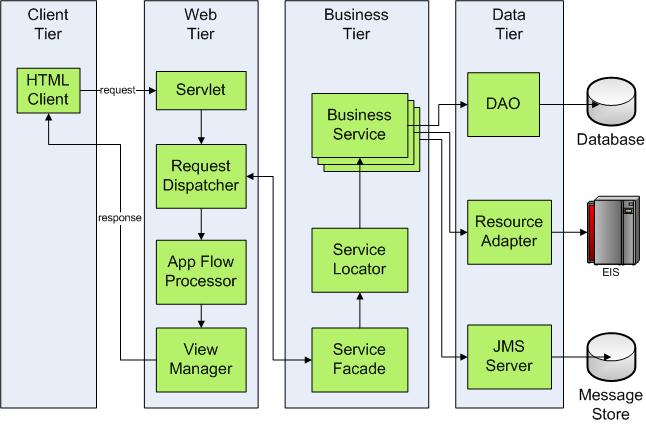
In a typical Java EE Web application, an HTML client posts a request to a server where the request is handled by the Web container of the application server. The Web container invokes the servlet that is configured to handle the specific context of the request.

Once the servlet has received the initial request, some form of request dispatching ensues in order to perform the necessary business logic for completing the request. One or more business services or components are then invoked to perform business logic.

Most business services or components require access to some form of data storage or information system. Oftentimes an abstraction layer between the business service and the data store is provided in order to protect against future changes in the data store. DAOs (data access objects) are often employed as data abstraction components in this situation.

When the DAO invocation step is complete, the response data is passed back up the chain of command, usually as one or more Java beans. The Java beans are then passed to some type of state machine and/or view manager in order to organize and format the markup response. When processing is complete for a given request, a formatted response is passed back to the HTML client.

Now, suppose we add a requirement to the application for asynchronous messaging between business service components. In a Java-based system, this would typically be handled using the Java Message Service (JMS) as shown in figure :


Most Web servers do not offer JMS as a standard feature, but it is simple enough to add a JMS implementation to a Web server environment.

The application scenario depicted in Figure above could be handled quite easily with just a Web server providing a servlet engine and JSP engine.

Now we add the requirement for connectivity between business services and disparate enterprise information systems. Java EE offers the Java Connector Architecture as a common standard to meet this challenge.


The architecture is now approaching a complexity that is arguably better suited for a Java EE application server.

A Web server such as Tomcat could possibly be used in combination with other frameworks to meet the requirements, but system management and monitoring complications might make the server/framework mix impractical.

Figure presents a moderately complex, Java-based, service-oriented architecture employing all of the technologies along with communication between multiple WAR deployments, EJBs, and Web services.


The architecture in Figure above has entered the realm of complexity that requires a tested, scalable, manageable Java EE enterprise application server. Once again, a development team with the proper skill level could use Tomcat for the Web tier and piece together technologies and frameworks to support the business and data tiers.

What i personally feel is to support this type of architecture using web server is Impractical. But Most of the tasks that are involved in J2EE environment can be supported by Apache Tomcat Web Server !!

Debug Tomcat HowTo

Step 1: Add these lines to [CATALINA_HOME]/bin/startup.bat:

SET JPDA_TRANSPORT=dt_socket
SET JPDA_ADDRESS=8000

and change this
call "%EXECUTABLE%" start %CMD_LINE_ARGS%
to this
call "%EXECUTABLE%" jpda start %CMD_LINE_ARGS%

Step 2: Startup Tomcat
Step 3: In Eclipse, go to Run | Debug... | Click on 'Remote Java Application' | New | Type in a name for the configuration, Select a project(keel-server) | Click Debug

Code search engines that you should know

Reusing the code/frameworks ( either the in public domain or FOSS licensed code) is pretty common. But searching for useful code online is not very easy.The regular search engines like Google or Yahoo are not designed for code searching. Now there are few specialized code search engines which can fetch better result. Here are the top five code search engines:

1. Google Code Search
2. Krugle
3. Koders
4. Oreilly Code Search
5. CodeBase
6. CodeFetch

All the above engines allow you to search on Language (like Java, C etc) and license (like GPL, MIT etc). Except for oreilly code search, rest of them search the internet. Oreilly code search contains the code from their books.Which currently contains over 123,000 individual examples, composed of 2.6 million lines of code all edited and ready to use. CodeFetch allows you to search all source code examples included in all books on all languages.

But make sure about license terms and conditions before reusing the code.