Lịch sử hình thành phát triển laptop Toshiba


Được thành lập năm 1875, với gần 135 năm phát triển, cho đến nay tập đoàn Toshiba đã trở thành một trong những tập đoàn công nghệ lớn của Nhật Bản và thế giới với nhiều chi nhánh cũng như đại lý phân phối phủ khắp toàn cầu. Kể từ chiếc notebook PC đầu tiên có tên T1100 ra đời vào năm 1985, đến nay Toshiba đã là một trong 5 nhà sản xuất notebook, laptop lớn nhất thế giới. Số liệu thống kê vào tháng 12 năm 2008, Toshiba đã bán được 60 triệu notebook PC trên toàn cầu. Đi cùng sự phát triển nhanh chóng của thế giới công nghệ, các sản phẩm notebook Toshiba đang ngày càng được cải tiến, với chất lượng đẳng cấp cùng nhiều tính năng đáng mơ ước mà ít sản phẩm laptop nào khác có được.


Là hãng đứng thứ 3 trong top 20 nhà sản xuất bán dẫn lớn nhất thế giới, Toshiba còn được biết đến nhiều hơn thế. Cũng như nhiều hãng công nghệ Nhật Bản khác, Toshiba tập trung mạnh vào việc nghiên cứu và phát triển các công nghệ mang tính đột phá, vượt trội trong thế giới IT. Các sản phẩm của hãng phần nhiều được sản xuất để nhắm đến việc quảng bá công nghệ hơn là doanh số, do vậy chất lượng các sản phẩm laptop Toshiba luôn chiếm được lòng tin cao từ người tiêu dùng. Nhờ vào uy tín thương hiệu và các sản phẩm với tính năng độc đáo, Toshiba đã chiếm được vị trí thứ 5 trên bảng xếp hạng các nhà sản xuất laptop lớn nhất thế giới, từ nhiều năm qua.


Các sản phẩm laptop của Toshiba bao gồm 4 dòng laptop phổ thông và hai dòng dành cho doanh nhân. Những thành công trong công nghệ cũng như vị thế dẫn đầu của hãng gắn liền với các mốc “World FIRSTS” sau:
  • Năm 1985, Toshiba sản xuất chiếc laptop đạt chuẩn công nghiệp đầu tiên được bán rộng rãi có tên T1100. Đây cũng là mẫu laptop được Toshiba chọn để trưng bày nhân dịp 25 năm bước chân vào thị trường sản xuất laptop.
  • 1986, Toshiba giới thiệu laptop đầu tiên sử dụng vi xử lý Intel Pentium 286.
  • 1987 tiếp nối với laptop đầu tiên trên thế giới dùng Intel Pentium 386.
  • Năm 1988, hãng giới thiệu chiếc laptop đầu tiên có ổ cứng trong.
  • 1989, Toshiba ra mắt laptop đầu tiên sử dụng pin nickel.
  • 1991, hãng phát triển thành công màn hình ma trận động (active matrix) đầu tiên dành cho laptop.
  • Đến 1992, Toshiba ra mắt laptop có màn hình màu TFT LCD đầu tiên.
  • Một năm sau, hãng ra mắt chiếc tablet PC đầu tiên có bút.
  • Chiếc laptop đầu tiên có ổ quang CD-ROM được mang nhãn hiệu Toshiba ra mắt 1995, đây cũng là năm Toshiba có chiếc laptop đầu tiên trên thế giới sử dụng pin lithium-ion.
  • 1997, laptop Toshiba là sản phẩm đầu tiên tích hợp DVD-ROM.
  • Một năm sau, lại là Toshiba đi đầu trong việc tích hợp chiếc CD-RW vào sản phẩm laptop của mình.
  • 2002, hãng giới thiệu chiếc tablet PC đầu tiên với cấu hình PC hoàn chỉnh.
  • Năm 2003, ra mắt laptop 17 inch dòng thay thế desktop đầu tiên trên thế giới. Toshiba vẫn luôn là người đi đầu trong việc tích hợp các công nghệ ổ đĩa quang vào laptop, với đầu ghi DVD trên laptop đầu tiên trong cùng năm.
  • 2005, laptop Toshiba là sản phẩm đầu tiên đạt chứng chỉ RoHS, đảm bảo không sử dụng các chất độc hại với sức khỏe con người.
  • Đến năm 2006, Toshiba chính thức giới thiệu laptop đầu tiên có ổ đĩa HD-DVD.
  • Một năm sau, hãng phát triển thành công ổ đĩa quang mỏng 7mm đầu tiên trên thế giới, với dòng laptop Portégé siêu mỏng nổi tiếng.

Các dòng sản phẩm laptop Toshiba có khá nhiều dòng máy phù hợp cho mọi đối tượng và nhu cầu khác nhau. Lịch sử hình thành và phát triển cũng cho thấy, Toshiba luôn đề cao các giá trị bên trong của sản phẩm, cùng với đó là việc cải tiến thiết kế cùng mẫu mã sản phẩm. Với lịch sử phát triển lâu dài và vị thế dẫn đầu trong lĩnh vực phát triển công nghệ, vô số mốc đầu tiên của thế giới, laptop Toshiba đã gây dựng được niềm tin vững chắc đối với người tiêu dùng.

Các mẫu laptop Toshiba có khá nhiều tùy chọn, cả bề ngoài lẫn cấu hình của từng dòng sao cho phù hợp nhất với khả năng tài chính và nhu cầu sử dụng, do đó có thể nói laptop Toshiba khá linh hoạt và phù hợp với đại đa số người dùng. Toshiba thành lập khá lâu đời, thương hiệu mạnh và uy tín. Chất lượng sản phẩm rất tốt và bền bỉ theo thời gian.


Thương hiệu Toshiba thâm nhập thị trường Việt Nam cũng khá lâu, bắt đầu với các thiết bị, linh kiện điện và điện tử gia dụng. Chất lượng và hiệu quả sử dụng là những yếu tố then chốt giúp Toshiba tạo dụng lòng tin nơi người tiêu dùng. Và nay, những chiếc laptop Toshiba tiếp tục chinh phục người dùng bằng những giá trị cốt lõi mà Toshiba đã xây dựng cho toàn bộ các dải sản phẩm của mình.

Nguồn: voz.vn

Simulate slow Internet Connection while testing your Apps

So you have your Next-gen cool Web 2.0 application ready! You have tested it on your LAN environment and on your high speed internet connection – all seems ok and you are ready to deploy it in the ‘real world’. A few hours later, you get feedback that your application does not perform well on slower connections. That hurts!
Well the truth is that real world internet connections are much slower than you think. Your application end users may not always be broadband users but also people accessing your app through a dial-up connection, mobile sets, 3G or USB dongles. Most designers and developers forget to test their application on slower internet connections, resulting in a poor performing application.
Now there are many tools that let you simulate slow network connections. Out of them, what caught my attention is a nice Firefox browser plug-in that ‘effortlessly’ lets you simulate different speeds of Internet connection and lets you view the effects of slow speeds on your application. The plug-in is called Firefox Throttle.
Firefox Throttle is an extension that allows you to control download/upload rates and monitor current bandwidth utilization. Amongst other features, what I liked the most was that it lets you throttle localhost connections as well. Cool! Here’s a screenshot of the plugin in action.

Bug Hunting 2010


Tập đoàn LogiGear chuyên về kiểm thử phần mềm phát động cuộc thi “săn” lỗi phần mềm với tên gọi “Bug Hunting 2010” từ ngày 12-7 đến hết ngày 15-8-2010. 


“Bug Hunting 2010” là sân chơi dành cho kỹ sư và các bạn trẻ đam mê kiểm thử phần mềm trên khắp thế giới. Cuộc thi nhằm phát hiện những tài năng và xây dựng một cộng đồng kết nối các kỹ sư kiểm thử phần mềm trên khắp thế giới, chia sẻ những công nghệ kiểm thử tiên tiến, đồng thời quảng bá Việt Nam là điểm đến quan trọng cho nguồn nhân lực kiểm thử phần mềm cho thị trường toàn cầu.

Để tham gia “Bug Hunting 2010”,thí sinh đăng ký thông tin tại trang VistaCon.vn và thực hiện bài dự thi bằng việc kiểm thử một ứng dụng web do ban tổ chức cung cấp. Kết quả chung cuộc được công bố vào ngày 31-8-2010.

Bài thi được đánh giá trên tiêu chí chất lượng lỗi phần mềm “săn” được và bảng báo cáo kết quả lỗi. Giải thưởng là chiếc vé tham dự hội nghị quốc tế về kiểm thử phần mềm tự động (VISTACon 2010) lần đầu tiên tổ chức tại Việt Nam từ 20 đến 22-9-2010 trị giá 450 USD, tham gia các lớp chuyên đề về kiểm thử tự động do các chuyên gia đến từ Microsoft, McAfee, LogiGear, Electronic Arts, Disney và Học viện công nghệ Florida báo cáo.

Theo Tuổi trẻ

Life in a Day – Sáng tạo cùng YouTube


YouTube vừa cộng tác với hai đạo diễn từng đoạt giải Oscar — và chính những người tham gia YouTube — để tạo một đoạn phim tài liệu dài tập về cuộc sống thường nhật trong một ngày của bạn. Cuộc thi “Life in a Day” sẽ bắt đầu từ ngày 24/07/2010 với hàng triệu người tham gia cung cấp các khung cảnh sinh hoạt thường nhật khác nhau trên toàn thế giới. 


Theo mô tả trên YouTube blog,”Mỗi ngày, sẽ có khoảng 67 triệu lượt người xem thế giới quanh họ qua ống kính độc đáo của riêng từng người. Hãy hình dung nếu có cách nào đó để sưu tập tất cả các nhân sinh quan đó, để tổng hợp và gút lại thành câu chuyện liền mạch về một ngày trên trái đất.”

Từ ngày 24/07 này, bạn sẽ có 24 giờ để quay một đoạn phim về cuộc sống của bạn, từ những tình huống thông thường đến phi thường. Sau đó upload video của bạn lên kênh “Life in a Day” của Youtube trước ngày 31/07/2010. Các cảnh quay hấp dẫn nhất sau đó sẽ được chọn lựa, biên tập và gộp lại thành một bộ phim đạo diễn bởi Kevin Macdonald (ông từng là đạo diễn của bộ phim The Last King of Scotland) và sản xuất bởi Ridley Scott (nhà sản xuất phim Gladiator).
“Life in a Day” sẽ ra mắt tại liên hoan phim Su-đăng 2011 (Sundance Film Festival) vào tháng Giêng năm sau. Tuy những người có các đoạn phim được chọn lựa sẽ không được tưởng thưởng vật chất, nhưng tên của bạn sẽ được giới thiệu như là một đồng đạo diễn (co-director), và chúng tôi sẽ chọn ra khoảng 20 người để tham gia buổi trình chiếu đầu tiên của bộ phim. Dĩ nhiên, bộ phim tài liệu này sau đó sẽ được ra mắt miễn phí trên YouTube để mọi người có thể thưởng ngoạn.
Bạn hãy ghi lại những khoảnh khắc sống động thường nhật của mình và gửi lên YouTube để tham gia cuộc thi "Life in a Day"
Dưới đây là một vài điều lệ mà bạn phải đáp ứng:
  • Bạn phải từ 13 tuổi trở lên
  • Phải có một tài khoản YouTube (miễn phí)
  • Phải tuân thủ các hướng dẫn trong bản YouTube Community Guidelines
Theo các chỉ dẫn này, sẽ không phải lo việc “sai hay đúng” về tài liệu cuộc sống quanh bạn. “Bạn có thể ghi lại cuộc sống của bạn cho chúng tôi hoặc chỉ mô tả trực tiếp về nó thông qua máy quay. Các cảnh quay của bạn có thể kéo dài từ 15 giây đến 2 giờ.”

Over 50 Free SEO tools about using SEO techniques

SEO tools are something that every freelancer with a website or blog can use. A proper understanding of SEO techniques can provide greater exposure for your business by increasing the traffic to your website.


In this post, I’ll touch on some of the basics about SEO (or search engine optimization), share a few basic techniques, and provide a list of over 50 free tools that you can use to analyze how well your freelance website is doing in the search results.

What is SEO?


For those of you who are not familiar with SEO, the term stands for search engine optimization. It refers to statistics and tools that you can use to analyze how a website indexed by the major search engines such as Google, Yahoo, Bing, MSN, and others. 
Ranking well in the search results can be important for a business because most people turn to the search engines when they are looking for a product or service. However, few people look at the results that appear after the first few pages. This means that if you are a freelance web designer and your web design site appears on page ten of the search engine results, prospective clients using a search tool are less likely to find your website than if your web design site appears on page one of the search engine results.
The matter is made even more complex by the fact that many search engines, such as Google for example, have recently started to personalize their search results to the individual user. For more details on this change, Danny Sullivan discusses personalized search engine results in detail at Search Engine Land. 
In fact, search engines frequently tweak and update the algorithms that they use to determine search results. They do this so often that a whole field of SEO specialists has formed. Those who are really serious about getting the best search engine results or about understanding how their website is currently doing in the search engines should consult a specialist. (Personally, I’m not a SEO specialist, but I do think that most freelancers can benefit from using a few basic SEO techniques).
There are two areas that most freelancers will want to think about when considering SEO for their freelancing website–their website design and their content.

SEO in Your Website Design


There are some strategies you can use when you design your freelancing website to make sure that it is search engine friendly. We’ve covered a few of these strategies before in our post, 10 SEO Techniques All Top Web Sites Should Use, but in case you missed that post here those points are again:
  • Pay attention to the title tag
  • Make use of the description and keyword meta tags
  • Include alt attributes on images
  • Use title attributes and descriptive text on links
  • Create a sitemap
  • Publish content that is relevant to your site’s purpose
  • Link out and receive links in from reputable sites
  • Use social media
  • Don’t use Adobe Flash or splash pages
A change to our original advice is that the Google and Yahoo search engines apparently no longer use the keyword meta tag. However, thinking through the process of what search terms (key words) might apply to your site is not a bad idea. It’s also important to remember that other search engines may still use the keyword meta tag.

SEO in Your Content


If you’re a freelance writer, you’ve probably been contacted at least once by a client or would-be client who has asked you to pack a piece of web content with an exact phrase, or phrases. The request can make for very awkward wording and, in a worst case scenario, make the content virtually unreadable.
The phrases or words that search engine users are likely to search for are referred to as keywords. The reason that a writer may be asked to repeat a certain word in an article or blog post is because the client may be hoping to achieve a certain key word density. Keyword density refers to the number of times that a keyword appears on a page. Theoretically, if a keyword or keyword phrase is used just enough times, the page in which it appears will rank higher in the search results. That is why some clients request web content that is packed with certain words or phrases. Using your keywords in the title of your page and in internal headings will also help your page range better for that phrase.
However, using a keyword excessively in web content is known as keyword stuffing. Those who use keyword stuffing mistakenly think that they are improving their rankings in the search engines. Actually, the practice can harm your search engine rankings. Even worse, keyword stuffing can frustrate your readers and cause them to mistakenly believe that your site is a spam site.
Many SEO specialists are now also recommending that content be optimized for something that they are calling social SEO. Social SEO simply means that your content is written with social media sites (such as Facebook and Twitter) in mind. It’s important to consider social media sites because more and more users are using these sites to discover content. If your freelance business blog ranks well in social media, it makes it that much easier for your clients to find you.

A Few More Words About SEO


Once again, it’s important to remember that search engines are constantly changing and evolving to meet the needs of their users. Google, and other search engines, update their search algorithms regularly in order to improve the quality of the information that their engine returns. 
Search engine optimization techniques that worked well a decade ago may not work well today. Likewise, search engine optimization techniques that work well today may not work well in a decade.

Over 50 Free SEO Tools


Now that we’ve discussed SEO theory, it’s time to share some free SEO tools. Keep in mind that most of the organizations that offer free SEO tools also offer paid SEO services. Some of these tools may represent trial offers, so read the fine print before downloading any tool. 
As I stated earlier, if you are serious about using SEO for your freelance business website or blog it is not a bad idea to get a consultation from one of these companies. If you decide to get some help with SEO, remember that not all companies have the same level of expertise, so make your selection carefully.
Here is the list of over 50 free SEO tools by source (in alphabetical order by the site where they are found):
  1. Link Popularity Checker–Shows inbound links for Google, Yahoo, MSN, AltaVista, Allintheweb & HotBot.
  2. MSN Position Search–MSN Search for up to 15 keywords on one domain.
  3. Page Rank Search–Google search results with PAGE RANK bar and inbound links.
  4. Yahoo Rank Position–Shows Yahoo rank position, number of entries indexed.
  5. Google Rank Position–Shows Google rank position, PAGE RANK, number of entries indexed, DMOZ and Google Dir status.
  1. Google vs Yahoo Graph–Graphically shows the top 50 in Google and Yahoo linked.
  2. Keyword Density Analysis–Determines density of one, two, and three word phrases.
  3. Multi Datacenter PageRank Checker–Checks page rank values across all Google data centers.
SEO Book (You must register to use these tools.)
  1. Rank Checker–Checks the rank of your site on Google, Yahoo, and Bing.
  2. SEO Toolbar–Allows you to view SEO data as you browse.
  3. SEO for Firefox–Adds SEO information to Google and Yahoo search results
  4. Myriad Search–Meta search that examines Google, Yahoo, MSN and Ask Jeeves.
SEOMoz (You must be logged in to use these tools.)
  1. Open Site Explorer–View site’s analytics on custom API.
  2. Linkscape–Professional inlink tool.
  3. SEO Toolbar for Firefox–Linkscape as a toolbar for Firefox.
  4. Term Target–Examines a specific page to see which keywords are used.
  5. Popular Searches–View the most popular sources for a specific date on a number of well-known sites including Technorati, Flickr, Del.icio.us, Yahoo Buzz, Google Hot Trends, eBay Pulse, AOL Hot searches, Lycos, Ask, and Amazon.
  6. Trifecta–Provides an estimate of the importance of a page, blog, or domain.
  7. Term Extractor–Analyzes a page and shows keywords.
  8. GeoTargeting Detection–Checks to see if your website is set up for geo targeting searches.
  9. SEO Toolbox–Includes many free SEO tools.
  1. SEMToolBarTM–Downloadable toolbar lets you view SEO information as your browse.
  2. Search Engine Optimization/KSP Tool–Provides Google and Yahoo search engine statistics for specified keywords.
  3. Check Server–Looks for issues that prevent your site from being crawled by the search engines.
  4. View Page Source–Shows the source code of a URL.
  1. Domain Age Tool–Determines the age of the domains entered.
  2. Domain Stats Tool–Enter domain and find out domain age, number of pages indexed, and number of backlinks.
  3. HTTP/HTTPS Header Check–Lets you examine the HTTP headers from the web server after you request a URL.
  4. Search Engine Friendly Redirect-Enter URL–Checks your redirect to see how SE friendly it is.
  5. Website Keyword Suggestions–Provides keyword suggestions along and keyword traffic estimates for the entered website.
  6. Backlink Anchor Text Analyzer–Blacklink analyzer that shows URL and anchor text.
  7. Check Yahoo Page Rank–Allows you to check the Yahoo WebRank of up to five URLs at a time.
  8. URL Rewriting Tool-Creates Mod–Rewrites rules to convert dynamic URLs to static looking URLs.
  9. Search Engine Spider Simulator–Displays page content minus code.
  10. Similar Page Checker–Compares pages for similar content.
  1. Keyword Research Tool–Tool returns similar keywords found in the meta keywords of sites searched by your choice of nine search engines.
  2. Link Appeal-Enter UR–Rates for link appeal.
  3. Link Popularity Checker-Enter URL–Displays backlinks on five search engines.
  4. Search Engine Position Checker-Enter URL/Keyword–Displays top 50 for nine search engines.
  5. HTML Header View–Shows HTTP headers the web server is sending.
  6. Web Page Analyzer-Enter URL/Keyword–Checks copy for optimization.
  1. WebSEOAnalysis–Comprehensive website analysis. (Exclusive)
  2. Keyword Battle–Shows how your site ranks for a particular list of keywords (Exclusive)
  3. Keyword Analyzer–Allows you to determine the percentage of keywords in a particular page.
  4. Duplicate Content–Lets you compare content between two URLs.
  5. HTML Validation–Determines whether a list of URLs are valid according to W3C standards.
  6. PageRank Check–Lets you check your site’s page rank.
  7. Multi DC PageRank–Lets you check your site’s page rank across multiple data centers.
  8. Indexed Pages–Shows which pages on your site are indexed in Google, Yahoo, and Bing.
  9. Link Popularity–Shows the number of incoming links to a URL.
  10. Reputation Tracker–Tracks recent social media mentions of your site.
  11. Domain Info–Provides the current status of your domain name.
  12. Site Submitter–Allows you to submit your site to major search engines and directories and includes recent traffic statistics.

From freelancefolder.com

Best Open Source Web CMS For .NET

CMS systems or web content management systems are used to organize and facilitate collaborative content creation. Best Open Source CMS is only appropriate according the needs of a web project. Some not so popular CMS can have tons of features but if it dosen’t attract web developers then, its a waste.

Choosing the right Open Source CMS in .NET is not very hard as you don’t have that tons of options, like in php. The most important aspects according to me is user interaction and security, which needs to be checked thoroughly before going ahead with your project.

Any CMS have certain features which they are supposed to provide, those are : To allow for a large number of people to contribute to and share stored data, Control access to data, based on user roles. User roles define what information each user can view or edit, Aid in easy storage and retrieval of data, Reduce repetitive duplicate input, Improve the ease of report writing, Improve communication between users.
 
Keeping all these factors in mind we have choosen some of the Best Open Source CMS for .NET, hoping that we have covered all of them.

Best Open Source CMS for .NET

Dotnetnuke : the most widely adopted Web Content Management Platform for building web sites and web applications on Microsoft .NET. Organizations use DotNetNuke to quickly develop and deploy interactive and dynamic web sites, intranets, extranets and web applications. The DotNetNuke platform is available in a free Community and subscription-based Professional, Elite and Elite Premier Editions. The open platform allows DotNetNuke to function as both a content management system (CMS) and application development framework. DotNetNuke allows your organization to leverage your existing Microsoft investments to create rich, highly interactive web sites and web applications.


Mojoportal : You can think of mojoPortal as a Starter Kit for Advanced ASP.NET Web Sites and Portals.  Out of the box, mojoPortal provides dynamic database driven web site(s) with an XHTML compliant Content Management System and community features like Blogs, Forums, Image Galleries, etc.


Umbraco : Umbraco makes it quick, easy and fun to develop web applications. Umbraco features an easy to use framework for working with dynamic content and javascript called umbraco Base. The umbraco Base framework enables developers to create simple urls to umbraco content and .NET resources, making it much easier to work with .NET-based data directly from any javascript framework, like jQuery, YUI, Prototype or whatever library you prefer to use.


Cuyahoga : Cuyahoga is an open source .NET web site framework. It provides content management capabilities and has a modular approach. Currently it works with MS .NET 2.0-3.5 with SQL Server, PostgreSQL or MySQL as database backend. Also, Mono is fully supported.


N2CMS : For those looking for an out of the box experience N2 CMS contains a package of functional templates with News, Wiki, Photo Galleries, FAQs, RSS, Data Entry, Polls and more. With these you’ll be up and running no time (demo). The functional templates are completly optional. If you want you can just use an adaptive editing interface that integrates quite nicely into any ASP.NET code. Features include full control of content and nodes, drag & drop, versioning, wizards, export/import, security, globalization and more.


Thebeerhouse : TheBeerHouse is a website developed with Microsoft’s MVC Framework which includes a number of features and modules that you expect from a typical CMS / e-commerce website, such as: Membership system with registration, login, profile setup and complete administration, Content management system for publishing and syndicating articles and photos, with support for categories, comments, rating and profile-based personalization, Opinion polls with support for multiple active polls and archived polls etc.


Kooboo : Kooboo CMS allows you to create a professional website efficiently without losing out on product quality. Based on the ASP.NET MVC system that you are familiar with, and our easy-to-use tutorials and quick response forum provide clear instruction and support to give you confidence to unleash your creative potential.


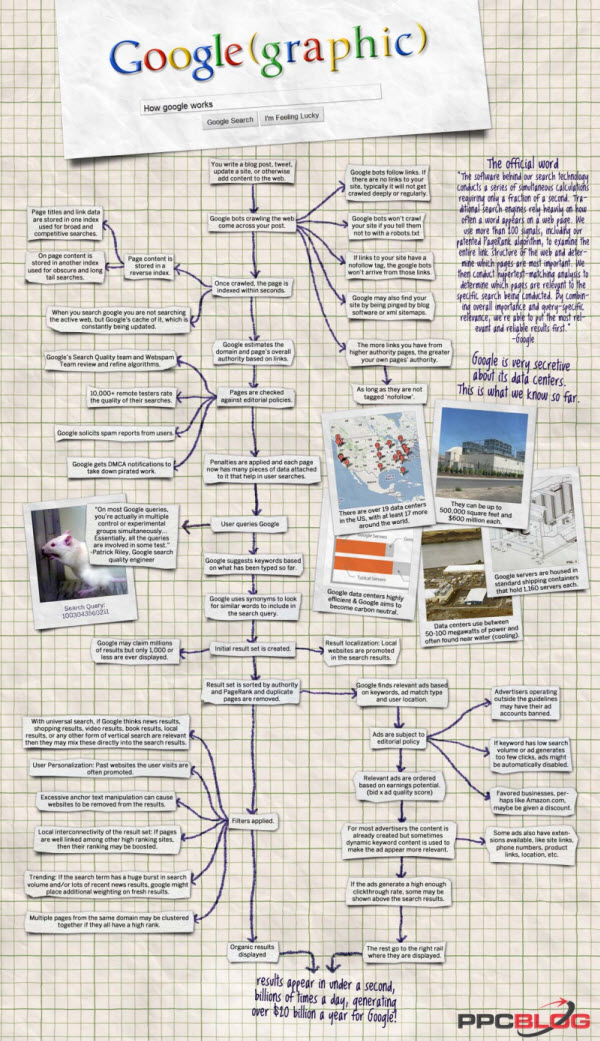
Learn How Google Works

How Does Google Work?

Infographic by PPC Blog